A free menu bar app for the Mac, in public beta
Frozen at your desk all day? Thaw.
Deskthaw waits out your calls, then gives you one short seated move for the part that is stiff.
Why another break app
Deskthaw asks what gets stiff and, when you are free, gives you one guided move for it.
It checks three things on your Mac, locally: whether the camera or mic is live, whether a meeting app is in front, and whether an app is fullscreen. If any of them is true it waits, for up to an hour in the fullscreen case. Otherwise it offers one short move, named for the part of you that is stiff, and gets out of the way.
There is no dashboard. You get a menu bar icon that changes shape, a menu whose first line says why, a small panel when a move is due, and a settings window.
Tell it what gets stiff.
It shows moves for the areas you pick. Six moves in the beta, each a minute or less, all done sitting down.
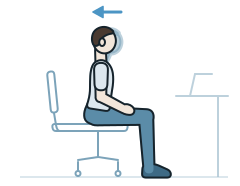
Neck
- Chin tucks50s
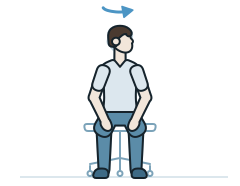 Slow turns60s
Shoulders and upper back
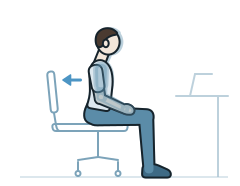 Shoulder blade squeezes40s
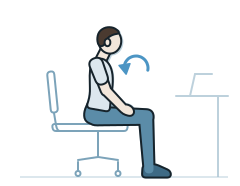 Backward shoulder rolls45s
Lower back
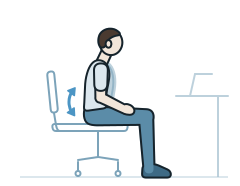 Seated pelvic tilts60s
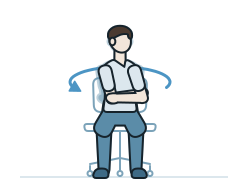 Seated rotations60s
Get the beta
Free while it is a beta, and notarized, so it opens the normal way. It asks for no camera, microphone, screen or accessibility permission.
Version 0.1.4. What changed
The download needs JavaScript and a quick bot check; email [email protected] if it won't start.
The beta download opens soon. Join the waitlist for one email when it is up.Join the waitlist
Not medical advice. Stop any move that hurts. See the terms.
Want to hear when the beta changes or ends? Leave your email.
- Tested on
- Built and tested on macOS 26, Apple silicon. It should run on macOS 13 and later and on Intel; I have not been able to test those. Tell me if it doesn't.
- First run
- Expiry
- The build stops working forty-five days after you first launch it, or sooner on the end date fixed in each build, and says so; there is no updater yet.
- Blind spot
- A call you are listening to in a browser tab with your microphone muted and your camera off produces no signal at all, so a move can come during it; skip it with one click. For a call app such as Zoom, tick it under Wait while these apps run… in the menu and Deskthaw waits while it is open, up to an hour at a time.
- Uninstall
- Remove local data and quit in the menu, then drag the app to the Trash. If you shared counts, copy the id first with Copy my install id and email it to [email protected]: that deletes the server's record, which otherwise expires ninety days after the last report.
Where this is right now
This is a public beta, with three areas and six moves and not much else yet.
It is free while it is a beta, and it stops working forty-five days after you first launch it, or sooner on the end date fixed in each build. There is no updater yet, so when that happens you come back here. The beta costs nothing; the preorder below is for the released app.
I am one person and this is the first build strangers have seen. It has been tested on one Mac: macOS 26 on Apple silicon. If it breaks on yours, Tell Deskthaw… in the menu opens a window with my address and a message to copy, and I read every one.
Pay once, for the released app.
The preorder is for the released Deskthaw Mac app on the Macs you use. The beta above is out now for anyone, with no sign-up, and stays free either way. No one will ever get lifetime updates for less than a preorder pays.
The app is expected by 31 March 2027. If that date cannot be met, you hear without having to ask, with the choice to wait or to cancel and be refunded.
Whether the app gets built depends on the beta test, read on 7 November. If it stops there, every preorder is refunded in full without you asking.
Stripe is the merchant of record and sends the receipt. In the United States and Canada, sales tax is added at checkout. Reserving accepts the terms.
$29paid once
- The released Mac app
- Lifetime updates for the first 500 preorders, for as long as Deskthaw is sold
- Fully refundable before it ships and for 30 days after
Email updates
For when the released app lands. One email when it does, and the occasional progress note before.
Questions
- Does it watch my screen?
- No. It reads macOS system state: whether a meeting app is in front, whether the mic or camera is live, and whether an app is fullscreen. It never asks for screen recording, so it cannot see what's on the screen. When you share your screen inside a call it is already waiting, because it saw the call.
- Why pay when Stretchly is free?
- Stretchly is a good free break timer, with break ideas and its own pause options. Deskthaw checks for calls by itself and shows you one seated move to do. If a plain timer works for you, use it.
- Windows or Linux?
- It runs on macOS; no Windows or Linux version is promised.
- What if I skip every break for a week?
- Nothing changes. Each skip just starts the clock again. There's no streak to lose and no guilt screen.
- Can I try it first?
- Yes: the beta is free. It stops working 45 days after you first launch it, or sooner on the end date fixed in each build, and it works that out on your Mac rather than on a server. Nothing in it uses the network except the count you are asked about at first run, and you can say no. The released app, and a trial of it, come later: the app is expected by 31 March 2027.
- I can't see the snowflake in my menu bar.
- Your menu bar is probably full. macOS hides the icons that don't fit, and on a MacBook they go behind the camera notch. Deskthaw notices and opens a window that says so, with the same settings as the menu. Moves still appear on time. Open Deskthaw again from Applications or Spotlight to bring that window back, or quit a menu bar app you don't need to make room.
- How do I get a newer beta build?
- Download it again and drag it into Applications over the old one; your settings stay, and the 45 days still count from your first launch, up to the new build's own end date. The beta never checks for updates itself. Leave your email beside the download to hear when a new build is out, and see what changed on the beta changes page.
- Is this a subscription?
- No. Pay once and it's yours. The first 500 preorders include lifetime updates, meaning updates for as long as Deskthaw is sold; after that, updates past the first year are optional, and the app keeps working either way.
- When does it ship?
- The beta is the first build: free, signed, and it ends 45 days after you first launch it, or on the build's fixed end date if that comes first. The released app is expected by 31 March 2027, the date in the terms. If that date slips, preorders get an email without having to ask, with a definite new date or a plain statement that there is not one, and the choice to wait or to cancel and be refunded.